
Guide · Updated 2026-08-12
How to check your resume's ATS score
An ATS score only means something against one specific job posting. Here's how to get that score in about five minutes, read the keyword gaps correctly, and fix the ones that actually matter — using the free checker in CareerPilot AI.
What an ATS score actually measures
An applicant tracking system stores your resume as parsed text so recruiters can search and filter candidates. Very few systems reject applications on their own — the real risk is not surfacing in the searches recruiters run for that role's skills, titles, and tools.
So a useful ATS score compares one resume to one posting on three things:
- Keyword and skills match — do the required tools, skills, and domain terms from the posting appear in your resume at all?
- Experience and seniority alignment — do your roles and bullets read like the responsibilities and level in the posting?
- Formatting and readability — does the document parse cleanly into sections, dates, and titles?
A single score with no job attached — the kind some tools give you from an upload alone — can only judge formatting. That's why every check below starts with a specific posting.
Step 1 — Paste your resume and the job description
Open the free ATS resume checker. Copy your resume as text into the left field and paste the entire job posting into the right field — requirements, responsibilities, and the "nice to have" list included, since that's where a lot of the searchable terminology lives. No account is needed.
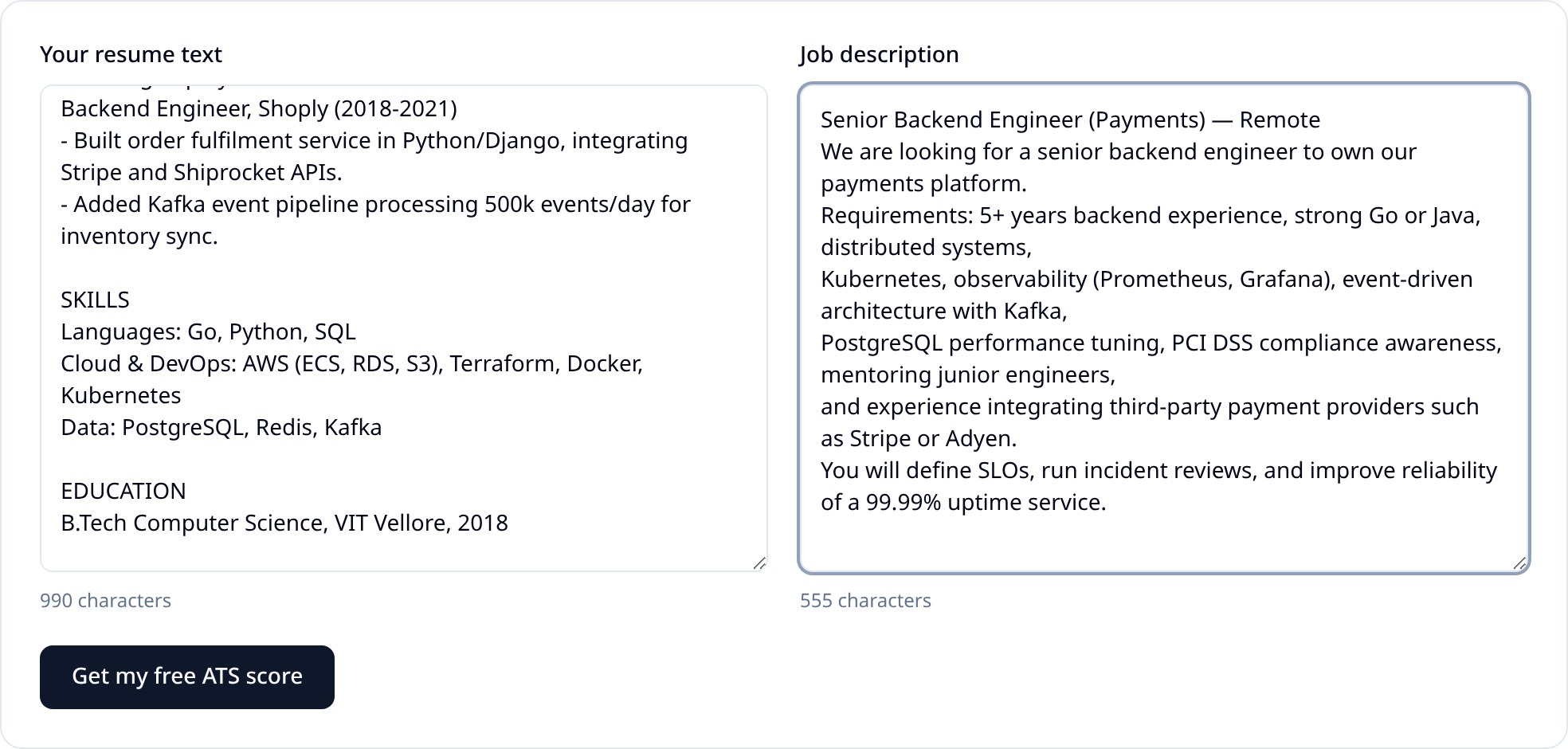
Two practical notes: paste text rather than describing your resume, because the checker scores the words a system would actually index. And use one posting at a time — merging two jobs produces a score that fits neither.
Step 2 — Read the score and the keyword lists
You get a 0-100 match score, a short read on why, and two lists: keywords you match and keywords that are missing or weak. The lists matter more than the number — they tell you exactly what to change.
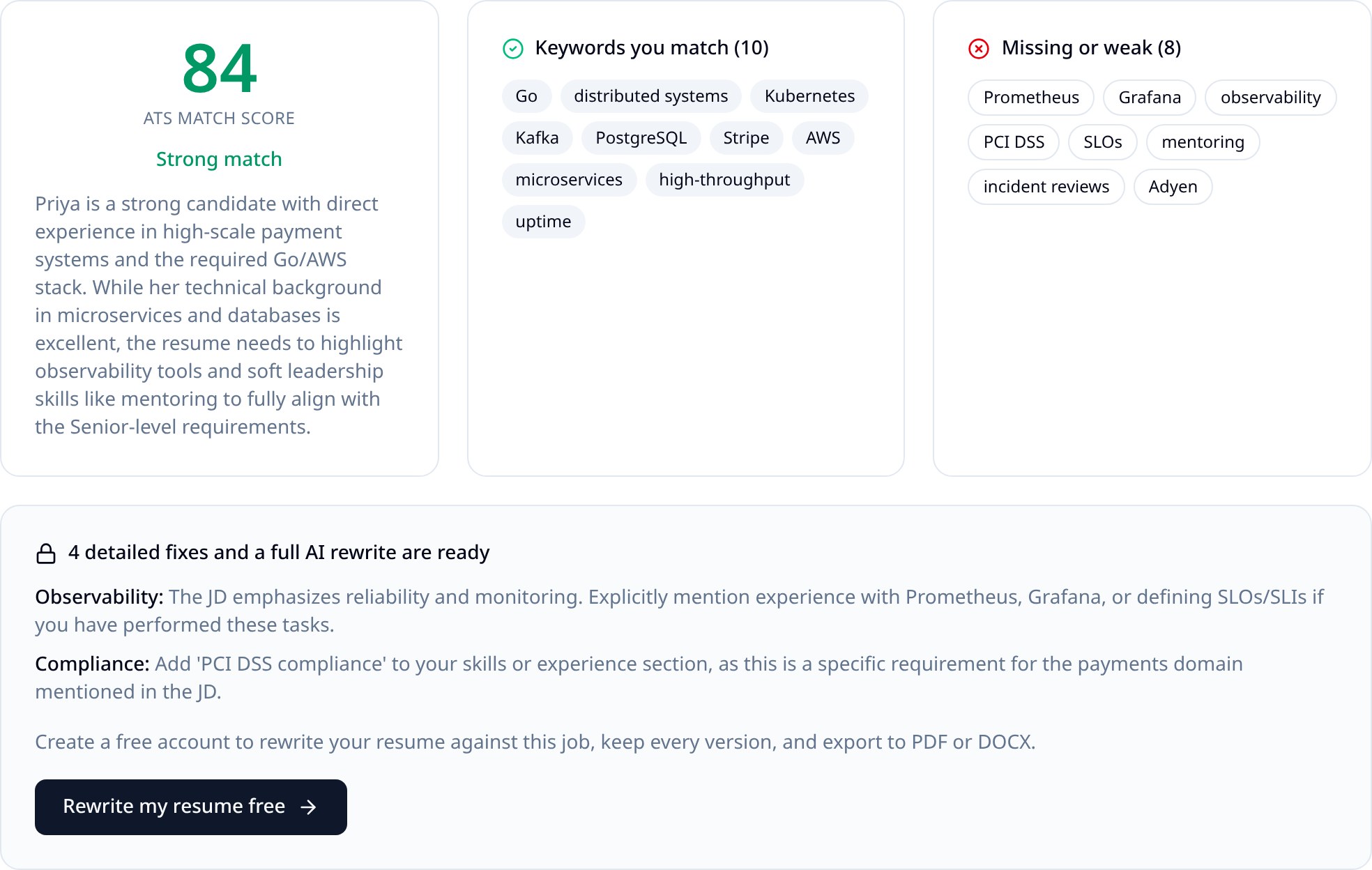
Read the missing list in two buckets. Some terms you genuinely have and simply never wrote down — those are free points. Others you don't have, and the honest answer is either to leave them out or to address them in your cover letter.
Step 3 — Fix the gaps you can honestly support
Work down the missing list and edit only where your real experience backs it up:
- Use the posting's exact wording for things you've done. If it says "observability" and you wrote "monitoring dashboards," say both.
- Move the most relevant role and bullets higher, and cut bullets that have nothing to do with this job.
- Keep skills grouped the way you already group them (Languages, Cloud & DevOps, Data) — grouped lists stay readable and still parse.
- Add outcomes, not adjectives: numbers, scale, latency, revenue, uptime, team size.
- Never add a skill you can't discuss in an interview. A keyword you can't defend costs you the screen, not the filter.
The checker also names specific fixes under the score — in the run above, adding observability tooling and PCI DSS exposure. A free account unlocks the full list plus an AI rewrite that stays inside your real experience.
Step 4 — Re-check before you apply
Paste the edited resume back in with the same posting and score it again. You're looking for the missing list to shrink, not for a perfect 100 — a resume stuffed with every term in the posting reads badly to the human who sees it next.
Then repeat per application. One score does not carry across jobs, which is why CareerPilot AI keeps every tailored version and its score alongside the job it was written for.
Is my resume ATS friendly? A quick checklist
- Single column, no tables or text boxes holding your experience.
- Standard headings: Summary, Experience, Skills, Education — not "My Journey."
- No text inside images or logos; a parser reads none of it.
- Consistent dates such as "Mar 2021 – Present" throughout.
- Real job titles that a recruiter would search for, plus the company name.
- PDF exported from text, or DOCX — never a scanned or exported image.
- Contact details as plain text lines, not inside a header graphic or sidebar image.
Fast self-test: paste your resume into a plain text field. If the sections still read in the right order and nothing disappears, a system can parse it.
What counts as a good score
| Score | What it means | What to do |
|---|---|---|
| 80–100 | Strong match on skills and seniority. | Apply, and use the missing list in your cover letter. |
| 60–79 | Relevant, but several required terms or signals are absent. | Tailor the summary, top role, and skills, then re-check. |
| Below 60 | Weak alignment, or the resume isn't written for this kind of role. | Rewrite for this posting, or target a closer-fitting role. |
FAQ
How do I check the ATS score of my resume?
Paste your resume text and the job description into a checker that compares the two, such as the free CareerPilot AI ATS resume checker. You get a 0-100 match score plus the keywords from the posting that appear in your resume and the ones that are missing. A score is only meaningful against one specific job, so re-check it for every application.
How do I know if my resume is ATS friendly?
An ATS-friendly resume parses cleanly as plain text: standard section headings, one column, no text inside images or text boxes, real bullet characters, and dates in a consistent format. If you copy your resume into a plain text field and the sections still read in the right order, an applicant tracking system can read it too.
What is a good ATS score?
Treat 80 and above as a strong match for that specific role, 60-79 as missing several required keywords or seniority signals, and below 60 as a resume that should be re-tailored before you apply.
Do ATS systems really reject resumes automatically?
Most applicant tracking systems do not auto-reject. They parse your resume into fields and let recruiters search and filter by keywords, titles, and skills. The practical risk is not being found in those searches, which is why keyword and title alignment with the posting matters.
Does checking my ATS score change my resume?
No. Scoring only reads the text you paste and reports back. Changes happen when you edit the resume yourself or run an AI rewrite, which needs a free account in CareerPilot AI.
Check your score now
Paste a resume and a job description and see your match score, matched keywords, and what's missing. Free, no signup.